
How to Set Up a Home Office: Ideas for the Best Work-From-Home Setup
Learn how to set up a home office that boosts focus, comfort, and performance. Practical work-from-home setup tips for remote and hybrid professionals.
What's on this page?
Jump to:
- Choosing the Right Space
- Getting Your Desk Setup Right
- Ergonomics for Long-Term Health and Focus
- Tools and Tech That Actually Improve Your Work-From-Home Setup
- Building Routines and Boundaries Around Your Home Office
- Improving Your Work-From-Home Setup Over Time
- Final Thoughts: A Setup That Supports Your Career
- How to Set Up a Home Office FAQs
Choosing the Right Space
I want to start by reassuring you: you don’t need a spare room to make this work. Most people working remotely are setting up in small flats, shared homes, or bedrooms, and they’re still doing great work. The key is being intentional with your space.
When it comes to your work-from-home setup, the first thing to consider is light and noise. Natural light helps more than people realise, significantly enhancing physical health, mental well-being, and productivity. Try to ensure you are in a room with as much natural light as possible, even if it’s just a desk near a window.
Noise matters too; not only can it cause distractions, but it can also interfere with meetings, calls and one-to-ones. Try to think about headphones or positioning yourself away from busy areas and walkways.
Separation doesn’t have to be physical either. I’ve seen people create a “work zone” in a corner of a bedroom, then pack it away at the end of the day. That psychological switch makes a real difference to focus and balance.
Getting Your Desk Setup Right
This is the part many people overcomplicate, so I’ll keep it simple. A solid work-from-home desk setup comes down to a few fundamentals:
-
Desk height: Your elbows should sit at roughly a right angle when you’re typing, without your shoulders creeping up.
-
Chair selection: You want proper lower-back support and feet flat on the floor, not dangling or tucked underneath you.
-
Screen positioning: The top of your screen should be around eye level so you’re not jutting your neck forward all day.
Everything else is optional. Fancy desks, cable trays, and accessories are nice, but they won’t fix poor positioning.
A quick five-minute check can make a big difference: sit back in your chair, relax your shoulders, adjust your screen height, and notice whether you’re leaning or hunching. Small tweaks here often unlock better focus and fewer distractions.
We see this pay off constantly, especially for learners balancing study with work. Better posture leads to better concentration. If you’re building new skills, these habits really support how effectively you learn and perform over time.
Fact: Nearly Half of Australians Work From Home at Least Some of the Time
Recent research shows that 46% of employed Australians – around 6.7 million people – work from home at least occasionally, with even higher rates in cities and desk-based industries.
As home working becomes a permanent part of working life, having a comfortable, functional home office setup is increasingly important.

Ergonomics for Long-Term Health and Focus
Ergonomics can sound like a nice-to-have, but for tech learners and remote professionals, it’s really about staying functional long term. I’ve seen too many capable people lose focus, confidence, or even momentum in their training and work because of persistent aches that could’ve been avoided.
Back pain from slouching, neck tension from leaning into screens, and wrist strain from awkward keyboard positions are the usual culprits. The good news is you don’t need to rush out and buy expensive kit.
Simple, low-cost changes often do the heavy lifting: raising a laptop on a stack of books, using an external keyboard, or adjusting your chair so you’re properly supported.
Over weeks and months, those small tweaks compound. You finish the day with more energy, recover faster, and stay sharper during deep-focus work. We think of this as career sustainability, not comfort. Looking after your body now makes it far easier to perform consistently as your workload and responsibilities grow.
Tools and Tech That Actually Improve Your Work-From-Home Setup
When people ask me about the best work-from-home setup, I always bring the conversation back to the essentials.
You don’t need a studio-quality setup, but you do need tools that are reliable, especially if you’re working in roles like Software Developer, Cybersecurity Analyst, or Project Manager.
-
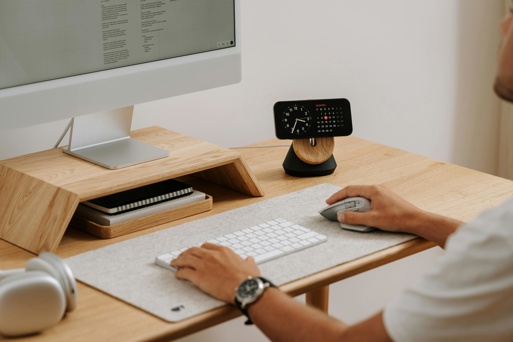
Monitor(s): A second screen is often the most impactful upgrade. It reduces constant tab-switching and helps you stay focused during coding, analysis, or planning work.
-
Keyboard and mouse: Comfort and responsiveness matter more than design. If you’re typing or navigating all day, this is where small improvements pay off quickly.
-
Headset and webcam: Clear audio and video make remote meetings smoother and help you come across as confident and engaged.
-
Internet reliability: A stable connection is non-negotiable. It removes unnecessary stress, prevents dropped calls, and keeps your workday running smoothly.
We always encourage people to prioritise function over aesthetics. When your tools work, your attention stays where it should be: on the task in front of you.
Fact: A Third of New Zealand Workers Do Some or All Work From Home
In New Zealand, 34% of employees reported working from home either part-time or full-time in mid-2025.
This level of adoption shows that home working is no longer temporary, making a well-thought-out home office setup essential for staying productive, engaged, and comfortable over the long term.
Building Routines and Boundaries Around Your Home Office
One thing I always stress is that your setup isn’t just physical. The way you use your space day to day matters just as much. Simple start-and-end-of-day routines help signal when you’re “on” and when you’re done.
That might be opening your laptop with a coffee in the morning, then closing everything down and physically stepping away at the end of the day.
In shared homes or busy flats, boundaries become even more important. Noise-cancelling headphones, clear signals to others, or time-blocking focused work can make a real difference.
I also encourage people to create a clear “work mode” mindset; even small habits like changing clothes or using the same desk light can help your brain switch gears.
This is especially relevant if you’re retraining or studying alongside work. Juggling learning with existing responsibilities takes focus, and clear routines help protect that time.
Improving Your Work-From-Home Setup Over Time
One of the best bits of advice I can give is not to aim for perfection on day one. Learning how to improve your work-from-home setup is really about checking in with yourself. Pay attention to where discomfort or friction shows up first. Is your neck sore by mid-afternoon? Are you constantly shuffling cables or switching tabs? Those clues tell you what to upgrade next.
I always encourage people to think about their own work patterns rather than copying someone else’s setup. As people settle into a role and workloads increase, we often see them tweak their space in small but meaningful ways. A better chair here, a second screen there. Over time, those changes add up. You end up with a setup that genuinely supports how you work.
Final Thoughts: A Setup That Supports Your Career
A good home office isn’t about having the latest gear or a picture-perfect space. It’s about creating an environment that helps you show up focused, comfortable, and confident in your work.
I always encourage people to reflect on what’s actually helping, and what’s getting in the way, before spending money. Small, thoughtful changes often make the biggest difference.
Wanting to kickstart your corporate career? You can book a free consultation with one of our career experts. We’ll help you think through your goals, your training options, and help you land on a career that truly works for you.