

IT Specialist Careers: How to Become an IT Specialist
Build a clear route into an IT Specialist role with the core technical skills, recognised certifications, and practical troubleshooting experience employers look for.

An IT Specialist supports, maintains and troubleshoots the technology that businesses rely on every day. To become one, you usually need a strong IT foundation, practical troubleshooting skills, recognised certifications and evidence that you can support users, devices, networks and systems.
Businesses in 2026 depend on technology for communication, security, remote work, cloud systems, customer service, and daily operations. Recent UK job market data found over 3,000 unique job postings for IT and cybersecurity roles between January and April 2026, with demand rated as high compared with the average for all occupations.
This guide breaks down the IT Specialist role clearly and simply, from the kind of work you would do each day to the certifications that can help you build credibility. I’ll also show you how to start moving towards your first IT Specialist role, even if you are coming in with little or no technical background.
Written by
With four years at Learning People and a solid foundation in IT and Cybersecurity, Chris guides people through the fast-evolving tech landscape and into their dream jobs. He combines hands-on technical expertise with insider industry insights to help learners make informed career decisions.

What's the fastest way into a cyber career?
Our complete cybersecurity training program is one of the fastest, most cost-efficient ways to go from "no experience" to "job market ready" in just a matter of months. We deliver everything you need to break into the industry and get hired:
-
Key Qualifications: Earn the exact credentials employers demand.
-
Bespoke Coaching: Get personalised guidance to ace your interviews.
-
Exclusive Network: Gain direct introductions to hiring companies.
Visit our page below to learn more about our career-launching cyber program and its pricing.
1. What Is an IT Specialist?
An IT Specialist is the person who helps keep an organisation’s technology working properly, from user devices and software to networks, cloud services and basic security. They are extremely valuable to businesses because they reduce downtime, help staff work productively, solve technical issues and support safe, reliable technology use across the business.
“IT Specialist” can mean different things depending on the company. In some workplaces it is a general support role, but usually it describes someone with deeper knowledge in areas such as networking, cloud, systems administration or cybersecurity. Many people start as an IT Support Technician, Help Desk Technician, or Junior Systems Administrator before moving into more specialised IT roles.
Can IT Specialist be an entry-level role?
So, I'd say that IT is one of the more practical entry routes into tech, and you do not need to walk in knowing every system when you start in IT. It requires more time and experience to find a specific area of IT to specialise in, such as cloud infrastructure or security. But many people begin in IT support or service desk roles, then specialise as they gain confidence and experience.
What matters at the start of your IT career journey is showing that you can learn, troubleshoot, communicate clearly and follow a sensible process. Recognised certifications, hands-on practice, and simple documented home lab work can all help show proof of these things to employers.
What does an IT Specialist do? Core responsibilities
An IT Specialist supports and maintains business technology so people can work safely and efficiently. They troubleshoot technical issues, set up devices, manage access, support networks and help protect systems from everyday risks.
Core responsibilities usually include:
-
Technical support: Helping users resolve issues with hardware, software, accounts, printers, email or business systems.
-
Device and system setup: Configuring laptops, desktops, mobile devices, operating systems and standard workplace applications.
-
Network and connectivity support: Helping diagnose Wi-Fi, VPN, internet, server or network access problems.
-
Account and access management: Setting up users, resetting passwords, managing permissions and supporting secure access.
-
Basic security support: Helping with updates, backups, antivirus tools, phishing awareness and security procedures.
Day in the life of an IT Specialist
An IT Specialist’s day is often shaped by the issues people need help with most urgently. In practice, that could include:
-
Checking support tickets: Reviewing user requests and deciding what needs attention first.
-
Troubleshooting user issues: Diagnosing problems with devices, software, logins or connectivity.
-
Setting up equipment: Preparing laptops, accounts and tools for new starters or team changes.
-
Maintaining systems: Applying updates, checking backups, monitoring alerts or documenting fixes.
-
Explaining solutions: Helping colleagues understand what went wrong and how to avoid the same issue again.
What is an IT Specialist’s salary?
IT Specialist and IT support salaries in the UK commonly range from around £24,000 to £45,000+, depending on location, seniority, certifications and specialism.
Pay can increase as you move into networking, cloud, cyber security, infrastructure or systems administration roles.
2. Certifications You Need to Become an IT Specialist
The most useful certifications for becoming an IT Specialist are the ones that prove your foundations in hardware, operating systems, networking and security. These are the areas employers usually expect to see first, especially for IT support, service desk and technical support roles.
Recruiters in 2026 often use certifications as a benchmark when someone is changing careers or does not yet have IT Specialist work experience.
They also help ATS (Applicant Tracking Systems) recognise relevant skills on your CV, which can make a real difference when you are applying for entry-level roles.
|
Level |
Recommended certification path |
Professional value |
|
Foundation |
Builds basic digital and IT literacy for complete beginners, giving you a clear starting point before moving into more technical certifications. |
|
|
Entry-level |
Validates core IT support skills across hardware, software, operating systems, devices and troubleshooting. |
|
|
Professional |
Builds networking knowledge, including connectivity, infrastructure, protocols and network troubleshooting. |
|
|
Advanced |
Supports progression into cyber security, infrastructure and more specialist IT roles by proving your understanding of security principles and risk. |
Learning People’s IT courses can be tailored to your starting point, target role and preferred route, whether you want to move into IT support, networking, cloud or an IT Specialist role.
3. Key Skills Required for an IT Specialist
IT Specialists need a mix of technical troubleshooting, system knowledge and calm communication. The role is not about knowing every answer instantly. It is about diagnosing problems methodically, following a sensible process and helping people get back to work.
Technical and hard skills an IT Specialist needs
-
Troubleshooting methodology: Knowing how to identify symptoms, test possible causes and work towards a fix without guessing.
-
Operating systems: Understanding Windows, macOS and sometimes Linux, because users and businesses rely on them every day.
-
Hardware and devices: Knowing how laptops, desktops, peripherals and mobile devices are set up, maintained and supported.
-
Networking basics: Understanding Wi-Fi, IP addresses, DNS, VPNs and common connectivity issues.
-
Cloud and identity tools: Building awareness of Microsoft 365, Azure, Google Workspace, Active Directory or user access systems.
-
Security basics: Understanding updates, passwords, phishing, malware, backups and safe user access.
Core soft skills an IT Specialist needs
-
Clear communication: Explaining technical issues in a way non-technical users can understand.
-
Patience: Supporting frustrated users without making them feel silly or rushed.
-
Prioritisation: Deciding which issues need urgent attention and which can wait.
-
Attention to detail: Recording fixes, following processes and avoiding small mistakes that create bigger problems.
-
Customer focus: Remembering that IT support is about helping people, not just fixing machines.
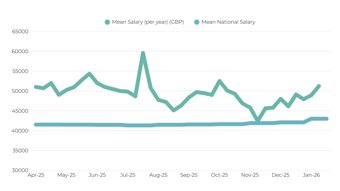
Did you know? IT professionals earn above the national average salary
The mean UK salary for IT and cyber roles overall in 2025 was £51,734, which is 24% above the national mean salary.
The mean salary has stayed steady for these roles, with a very strong growth trajectory since November 2025, growing from £42,416 to £51,234 (+20%).
4. The Roadmap: How to Become an IT Specialist Step-By-Step
To become an IT Specialist, you need to build foundational IT skills, gain recognised certifications, practise troubleshooting (which you can do at home), and apply for support-focused roles that bring you close to real systems. Below, I’ve broken that route into five practical steps you can start working through.
Step 1: Research entry-level IT roles
Start by looking at job descriptions for roles such as IT Support Technician, Service Desk Analyst, Help Desk Technician, Technical Support Specialist, Junior Systems Administrator and IT Technician.
You will likely see repeated requirements such as CompTIA A+, Windows, Microsoft 365, Active Directory, networking basics, troubleshooting, ticketing systems and customer support. Also, do not worry if every job title looks slightly different. “IT Specialist” can mean different things depending on the company, so your first step may not have that exact title.
Step 2: Build IT foundations
Before specialising, focus on the basics that appear in almost every IT role. Learn how hardware works, how operating systems behave, how software is installed, how user accounts are managed, and how basic networking and security fit together.
Where possible, practise with your own devices. Set up a laptop from scratch, explore Windows settings, connect devices to Wi-Fi, install software safely, or learn how password resets and user permissions work. The aim is not just to memorise IT terms. It is to understand how systems connect in real life.
Step 3: Earn professional validation
Enrol in structured training that leads to recognised IT certifications, such as CompTIA A+, CompTIA Network+ and CompTIA Security+. These certifications help show employers that you understand the core knowledge needed for IT support and technical roles.
They can also help your CV pass recruiter checks and ATS, especially if you do not yet have direct IT experience. While you study, document what you practise: setting up devices, configuring accounts, troubleshooting connection issues, or building a small home lab.
Step 4: Build practical evidence
Employers need to see that you can apply what you are learning. A small “proof of skills” portfolio or support log can help you stand out, especially for entry-level roles.
You could:
-
Build a home lab
-
Set up a virtual machine
-
Configure a router
-
Document a troubleshooting process
-
Create a mock help desk ticket
-
Explain how you fixed a device or connection issue.
This does not need to be overly complicated. It just needs to show practical thinking, clear communication and a sensible approach to solving problems.
Step 5: Apply for support and bridge roles
Apply for entry-level roles such as the ones mentioned above. These roles help you build real-world experience with users, systems, devices and networks.
Update your CV and LinkedIn around troubleshooting, customer support, systems, networking and certifications. It is also worth connecting with IT Specialists, recruiters and alumni. Ask what tools they use every day, what helped them get hired and what they wish they had learned sooner.
Tip: If you are not ready for an IT Specialist role yet, look for bridge roles in customer support, admin, operations or retail tech support where systems, devices or troubleshooting are part of the job.
Conclusion: What’s My Next Move for Becoming an IT Specialist?
The next move is to compare current IT support and IT Specialist job descriptions, then look for the skills and certifications employers keep repeating. You will usually see areas like troubleshooting, networking basics, customer support, CompTIA A+, Network+ and Security+.
Becoming an IT Specialist is realistic for beginners, but it works best when you build solid foundations, gain recognised certifications and prove that you can solve practical technical problems.
At Learning People we can help you turn that into a clear training plan, from choosing the right IT certification pathway to structured learning, CV support, interview preparation and access to employer opportunities.
Ready to plan your route to becoming an IT Specialist?